Features
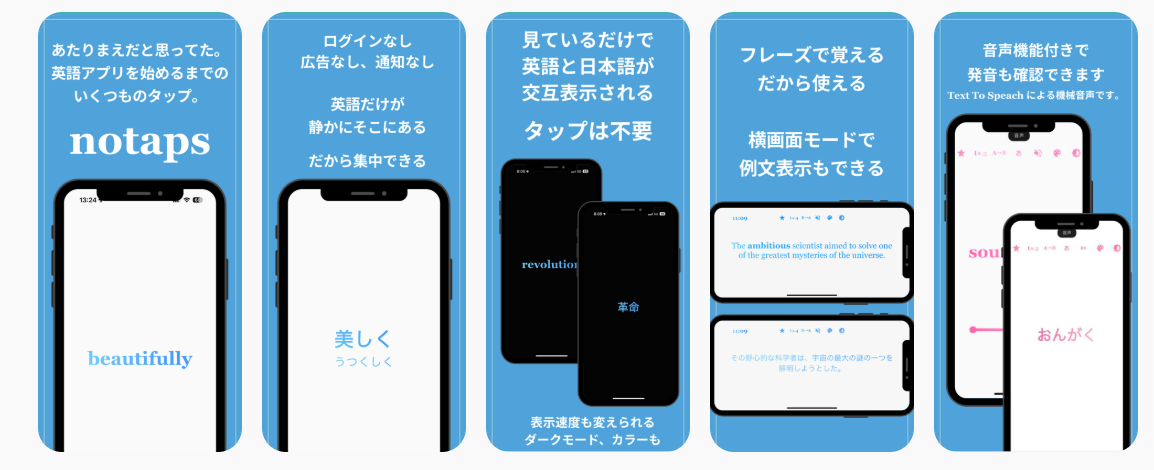
Completely tap-free
Open it and learning starts. No selection buttons to press. Use it while waiting for your PC to boot, eating with your hands full, or drying your hair. Turn a few wasted minutes a day into learning time.
Distraction-free
Automatic playback turns the spare minutes you already have into learning time. Ads in the free Android version follow regional consent choices and disappear with the one-time Premium unlock.
One-time purchase
A few hundred yen unlocks every feature. Cheaper than one trip to the convenience store.
No login required
Core vocabulary learning works offline. Purchases and restores, quality analytics, and ads in the free Android version require a connection.
📚 Series
Concept
Learning no longer requires interaction.
notaps is a vocabulary-training app you just watch.
Quietly, but firmly, the words stick.
🔹 Overview
notaps is a simple learning app that auto-plays English and Japanese vocabulary.
✅ Automatic playback.
✅ Minimal interaction while learning.
✅ Ad-free with Premium.
✅ Pronunciation practice.
✅ No login.
So you can "watch when you want to" and "watch even when you are tired."
You just watch — words and meanings flow automatically, settling into your memory little by little but reliably.
Main features
- Auto-alternating word and translation display (fully automatic playback)
- Vocabulary swappable by learning level (preschool through working adult)
- Tilt the phone to switch between "memorized" and "unlearned" words
- Landscape mode shows example sentences
- Adjustable display speed to match your learning pace
How to use
🟡 Basic behavior
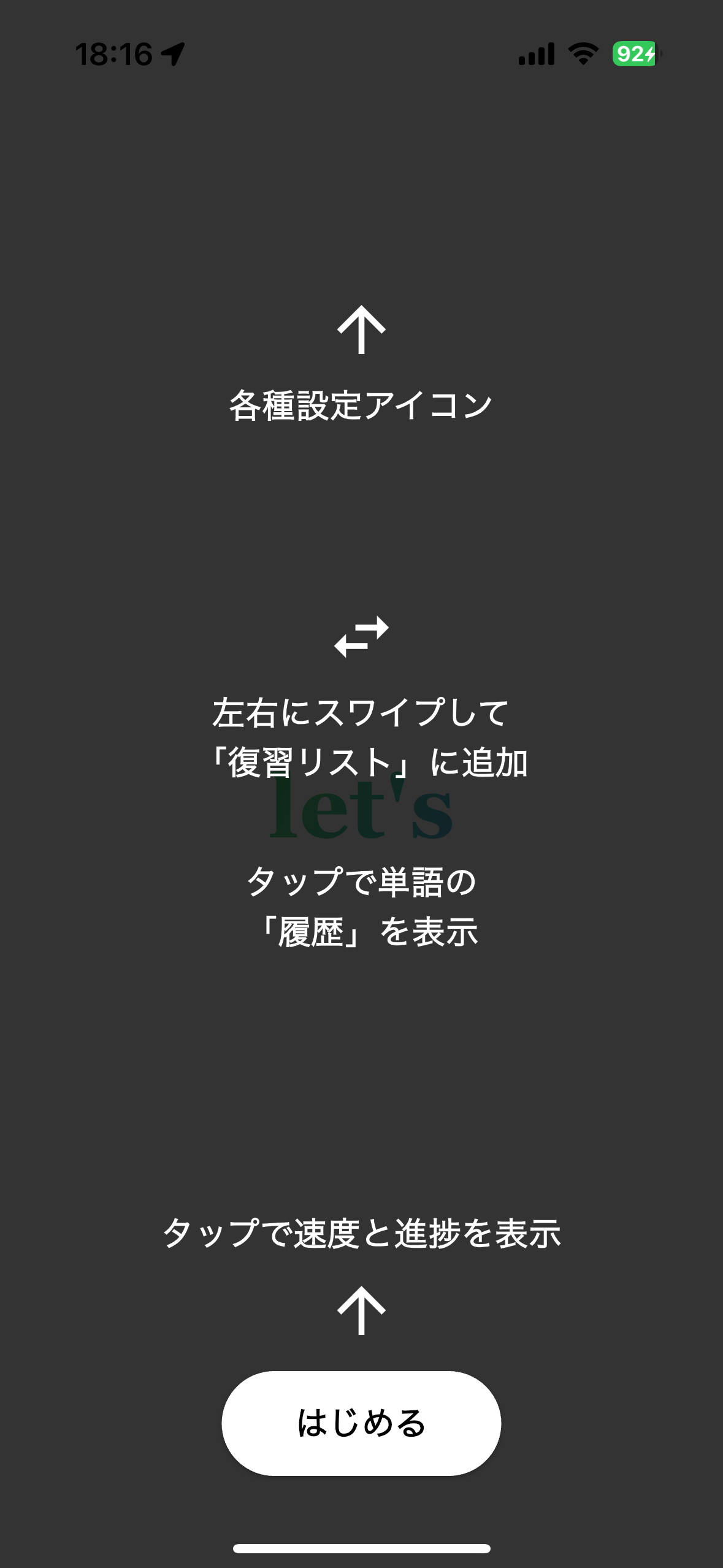
English words display in the center of the screen and alternate with their Japanese translation every few seconds. No operation required — the "no-tap" design lets memory build just from watching.
🧠 Swipe to flag for review
While a word is displayed, swipe left or right to register it in the review list (Lv.Re). Registered words can be reviewed later at the Lv.Re level. Swipe again to remove them from Lv.Re.
🎚️ Adjust display speed
Tap the screen to reveal a slider and progress bar. The slider adjusts word-switching speed between 0.5 and 5 seconds. Long-press the progress bar to reset it.
🟢 Top-icon functions
Star (developer link), level toggle, display order, display mode, voice toggle, color theme, light/dark toggle — all switchable with a single tap.
📘 Recent 100 Words (history)
Tap the screen and a progress bar of recently-seen words appears below the slider. Up to 100 tapped words are saved as history and can be reviewed at any time.
📚 Series roadmap (planned)
- Chinese, Korean
- Junior-high, high-school, university entrance exams
- Certification preparation
- Other spare-time learning topics
FAQ
Apple refund request page
notaps Privacy Policy
✅ 1. Personal information
notaps requires no account and does not collect your name, email address, contacts, or precise location. Anonymous technical and usage data needed to operate and improve the service is processed as described below.
- No account creation or login
- Pronunciation audio and images you select are processed on-device and are not uploaded to our servers
- Core learning works offline; quality analytics, ads, purchases, and restores use network connections
✅ 2. Data collection and storage
Learning progress and settings (display speed, display mode, etc.) are stored on your device. Anonymous usage data is also processed to improve reliability and the learning experience.
- Firebase Analytics / Crashlytics processes app interactions, app-instance, device and OS information, and coarse region
- Analytics events do not contain names, email addresses, raw purchase tokens, or raw order IDs
✅ 3. Ads and tracking
The free Android version uses Google AdMob. Where required, a consent form is shown and Google may process advertising identifiers according to your choices.
- The one-time Premium unlock removes ads
- We do not sell personal data or use analytics data for tracking across other companies’ apps or websites
- Where available, advertising privacy choices can be reopened from the app
✅ 4. Purchase information
Purchases are processed by the App Store or Google Play. We do not receive card numbers, Apple IDs, or Google account details.
On Android, the purchase token is sent over encrypted transport to our verification service and checked with the Google Play Developer API. Raw tokens and order IDs are not stored; only SHA-256 hashes, purchase state, and a random installation ID needed for restoration, fraud prevention, and audit are retained. Verification-attempt logs are deleted after seven days. On-device data can be removed by deleting the app, and privacy inquiries may be sent below.
✅ 5. Contact
For privacy inquiries, please contact us at:
Before you start
- iOS app
- 聞き流し英単語・単語帳・暗記・語彙力・例文
- What it does
- Auto-play vocabulary and example sentences during commuting, chores or a quiet evening.
- Content and features
- 11,677 words and 15,904 cards / 20 language options / Sleep timer, pronunciation practice and review
- Requirements
- iOS 18.0 or later
- Free access and purchases
- Try a limited vocabulary selection for free; a one-time in-app purchase unlocks all levels and other premium features.
- Before choosing
- Not a grammar course or live conversation service. Translation and speech features depend on device, OS and installed language data.
iOS facts checked: · Current App Store listing and purchase terms ↗